hyperf2.1+ElementUi实现后台登录单页demo
php / 管理员 发布于 5年前 1339
最近有个项目打算用hyperf + jwt + vue + element ui做个后台
先开个头,做个后台登录功能
环境介绍
后端:hyperf2.1 + jwt
前端:vue2.5+ element ui 2.15+
  "dependencies": {
    "element-ui": "^2.15.6",
    "vue": "^2.5.2",
    "vue-router": "^3.0.1",
    "vuex": "^3.6.2"
  },
前端目录:截图一下 就不写了 懒
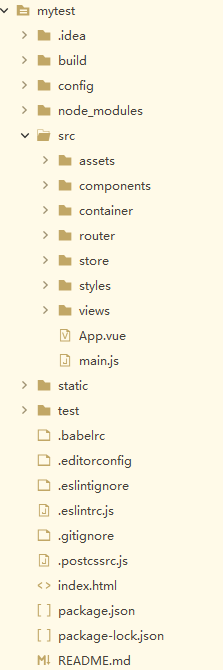
实现功能:登录单页demo
后端hyperf+jwt (之前有记录文章的,有兴趣的自行去下面的url看看)
https://www.zongscan.com/demo333/89383.html前端vue
路由
/nodejs/mytest/src/router/index.js
import login from '@/views/login'
  routes: [
    {
      path: '/login',
      name: 'login',
      component: login
    }
  ]
登录单页代码
/nodejs/mytest/src/views/login.vue
<template>
    <div class="login-container">
        <el-form :model="loginForm" :rules="rules2" status-icon ref="loginForm" label-position="left" label-width="0px" class="demo-ruleForm login-page">
            <h3 class="title">Hyperf+ElementUi后台登录</h3>
            <el-form-item prop="username">
              <el-input type="text" v-model="loginForm.name" placeholder="用户名"/>
            </el-form-item>
            <el-form-item prop="password">
              <el-input type="text" v-model="loginForm.password" placeholder="密码"/>
            </el-form-item>
            <el-checkbox v-model="checked" class="rememberme">记住密码</el-checkbox>
            <el-form-item style="width:100%;">
                <el-button type="primary" style="width:100%;" @click="handleSubmit" :loading="logining">登录</el-button>
            </el-form-item>
        </el-form>
    </div>
</template>
<script>
export default {
    data(){
        return {
            logining: false,
            loginForm: {
                name: 'admin',
                password: '123456',
            },
            rules2: {
                name: [{required: true, message: 'please enter your account', trigger: 'blur'}],
                password: [{required: true, message: 'enter your password', trigger: 'blur'}]
            },
            checked: false
        }
    },
    methods: {
        handleSubmit(event){
          this.$refs.loginForm.validate((valid) => {
              if(valid){
                  this.logining = true;
                  if (this.loginForm.name === '' || this.loginForm.password === '') {
                    this.logining = false;
                  } else {
                    this.axios({
                      method: 'get',
                      url: 'https://blog.zongscan.com/admin/login',
                      //get用params post用data
                      params: this.loginForm
                    }).then(res => {
                      this.logining = false;
                      console.log(res.data)
                      //保存token
                      localStorage.clear()
                      localStorage.setItem('token','Bearer ' + res.data.token)
                      this.$router.push('/')
                    }).catch(error => {
                      this.logining = false
                      this.$alert('账号或密码错误!', 'info', {
                          confirmButtonText: 'ok'
                      })
                    })
                  }
              }else{
                  console.log('error submit!');
                  return false;
              }
          })
        }
    }
};
</script>
<style scoped>
.login-container {
    width: 100%;
    height: 100%;
}
.login-page {
    -webkit-border-radius: 5px;
    border-radius: 5px;
    margin: 180px auto;
    width: 350px;
    padding: 35px 35px 15px;
    background: #fff;
    border: 1px solid #eaeaea;
    box-shadow: 0 0 25px #cac6c6;
}
label.el-checkbox.rememberme {
    margin: 0px 0px 15px;
    text-align: left;
}
</style>
效果图:
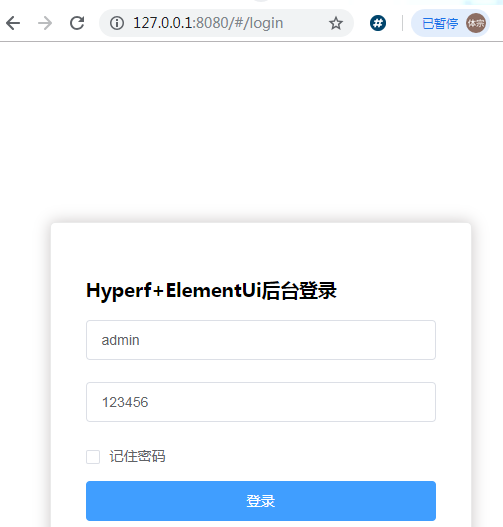
点击登录就进首页了 后面在记录文章
有兴趣的可以收藏一下
- 相关文章
- Laravel从Accel获得5700万美元A轮融资(0个评论)
- PHP 8.4 Alpha 1现已发布!(0个评论)
- 用Time Warden监控PHP中的代码处理时间(0个评论)
- 在PHP中使用array_pop + yield实现读取超大型目录功能示例(0个评论)
- Property Hooks RFC在PHP 8.4中越来越接近现实(0个评论)
- 近期文章
- OpenCode宣布DeepSeek V4.1 Flash免费提供,但仅支持200K上下文(0个评论)
- OpenAI的GPT-6正式发布并宣告:欢迎来到AGI时代(0个评论)
- DeepSeek API即将大幅涨价:大模型行业的“免费红利期”正式宣告结束(0个评论)
- 因AI智能体无法被拖欠工资,很多公司开始重新招聘人类程序员(0个评论)
- 简单英文|基本英语C.K. Ogden , 850个单词就能表达日常且30小时就能学会!(0个评论)
- 最先进AI大模型Claude Fable 5发布仅72小时,从巅峰到美国政府以国家安全为由纳入出口管制!(0个评论)
- Claude Opus 4.8 正式发布,传闻:"Opus 4.8可能是蒸馏的Mythos!"(0个评论)
- OpenAI GPT-5.5正式发布:更会编程和使用计算机的最强模型!(0个评论)
- opencode AI智能体自主规划开发游戏:王者荣耀模拟战游戏初体验!英雄角色开发中...(0个评论)
- opencode AI智能体自主规划开发游戏:王者荣耀模拟战游戏初体验!(0个评论)
- 近期评论
-
test1 在
opencode + Oh-my-openagent,我的第一个免费的ai编程智能体管家:Sisyphus中评论 test.. -
122 在
学历:一种延缓就业设计,生活需求下的权衡之选中评论 工作几年后,报名考研了,到现在还没认真学习备考,迷茫中。作为一名北漂互联网打工人.. -
Zita 在
Google AI Studio升级全栈 vibe coding体验,可直接构建带登录和数据库的应用中评论 111222.. -
123 在
Clash for Windows作者删库跑路了,github已404中评论 按理说只要你在国内,所有的流量进出都在监控范围内,不管你怎么隐藏也没用,想搞你分.. -
原梓番博客 在
在Laravel框架中使用模型Model分表最简单的方法中评论 好久好久都没看友情链接申请了,今天刚看,已经添加。..
Copyright·© 2019 侯体宗版权所有·
粤ICP备20027696号

